
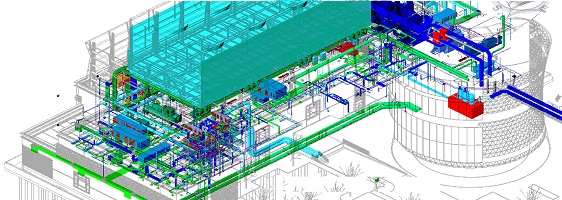
As MEP systems continue to become a complex system and as drawing coordination continues to require additional time and energy, the ongoing argument between AutoCAD MEP vs Revit MEP is now an ever growing concern for MEP engineering teams. Energy codes that are stricter than before; decreased project schedules; and increased levels of precision in the drawings have created a need for MEP workflows that provide more than just 2D production of drawings. MEP workflows need to support the development of accurate system logic, collision-free routing, and the ability for multiple disciplines to collaborate on the same model.
Many companies are currently interested in using technologies that allow them to effectively manage their increasing complexity. These companies are attempting to determine if they should continue using their existing, more traditional drafting tools (e.g. AutoCAD MEP) or if they would benefit from using the newer ‘intelligent’ modelling tools such as Revit MEP.
The results of industry research that has been performed by Autodesk and Dodge Data and Analytics clearly demonstrate a trend toward greater usage of integrated design delivery methods, which ultimately will provide an opportunity for engineering teams to create their long term design technology strategies based on the information received in this industry research.
The strengths and weaknesses of AutoCAD MEP and Revit MEP along with the strategic implications for an MEP Director, BIM Manager, or Design Lead so that they may make informed, future oriented decisions
1. Why Does This Comparison Matters More Than Ever?
Today, MEP projects are increasingly complex due to stricter energy standards, project timelines that require expedited construction schedules, complicated artisan coordination, and high model quality expectations imposed by the client on behalf of the contractor. While traditional CAD-based workflow can provide outputs for each discipline within the model as desired, they can struggle with issues related to multi-disciplined coordination, tracking design changes across multiple frameworks, and generating meaningful analytical data throughout the design process.
For firms that have long relied on AutoCAD MEP workflows, the question is no longer “Can we produce drawings?” but “Can we reliably deliver coordinated, clash-aware models that reduce field risk?” Teams that remain predominantly operating with MEP in AutoCAD for 2D documentation face the widening gap that increasingly exists between their 2D-centric documentation and clients’ BIM-first demands.
In addition, BIM adoption continues to grow globally. Research shows that using BIM lowers the frequency of clashes, reduces RFIs, and allows for more accurate predictions of construction costs. Therefore, when comparing your current processes with the implementation of BIM, it is not only a comparison of technical aspects; it is also a strategic decision regarding how you will operate as a business going forward.
2. What Is AutoCAD MEP?
AutoCAD MEP is a discipline-specific toolset built on top of AutoCAD. It enhances the familiar drafting environment with MEP-focused tools, making it appealing for teams that want to evolve gradually from pure 2D to a more integrated 3D approach without overhauling every process.
Key Capabilities of AutoCAD MEP
- Layer-based drafting with MEP-specific object types
- Symbol and device libraries for HVAC, electrical, and plumbing
- Basic 3D representations for routing and coordination visuals
- Robust DWG compatibility for contractors and fabricators
- Deep customization of standards, layers, and templates
Ideal Use Cases
AutoCAD MEP is particularly effective when:
- Projects hinge on existing DWG record drawings
- Contractor partners expect CAD-based shop drawings
- Teams want incremental change rather than full BIM adoption
- Documentation volume and drafting speed are more important than model intelligence
In environments where AutoCAD MEP is deeply integrated into daily workflows, the platform still provides a stable and predictable path for delivering construction documentation.
However, as organizations strive for more sophisticated models and analytics, relying solely on MEP in AutoCAD can create a bottleneck in coordination, change management, and downstream data utilization.
3. What Is Revit MEP?
Revit MEP is Autodesk’s BIM platform for mechanical, electrical, and plumbing systems. Unlike CAD, which primarily represents geometry, Revit builds a parametric, data-rich model that can drive calculations, coordination, and lifecycle insights.
In many firms, Revit MEP Autodesk deployments have transformed how engineering teams design, review, and coordinate building systems. Instead of redrawing changes across multiple views, teams adjust a single model and automatically update plans, sections, schedules, and quantities.
Key Capabilities of Revit MEP
- Parametric modeling for ducts, pipes, conduits, and equipment
- Intelligent connectors and system definitions
- Built-in interference checking and clash analysis workflows
- Multi-discipline coordination with architectural and structural models
- Automated schedules, quantities, and material takeoffs
- 3D visualizations, sections, and walkthroughs for stakeholder reviews
- Cloud-enabled collaboration via Autodesk Construction Cloud
Revit’s strengths in Revit MEP mechanical design are especially evident in complex healthcare, industrial, aviation, and high-rise projects, where system performance, routing complexity, and tight tolerances are crucial.
Industry studies, such as Autodesk’s SmartMarket report on BIM and ROI, demonstrate that BIM workflows help reduce rework, improve coordination, and lower final construction costs. For example, a Dodge Data & Analytics study, in collaboration with Autodesk, reports that 85% of AEC professionals believe BIM contributes to reduced construction costs and improved project outcomes, as highlighted in the “Top Benefits of BIM for General Contractors” report.
4. Feature Comparison: AutoCAD MEP vs Revit MEP
Below is a structured comparison aligned to design approach, coordination, documentation, performance, and industry alignment.
A. Design Approach
|
Feature |
AutoCAD MEP |
Revit MEP |
|
Primary Workflow |
Drafting & layout |
Intelligent BIM modeling |
|
Data Intelligence |
Low |
High, fully parametric |
|
Systems Logic |
Manual |
Automated calculations & connectors |
|
Deliverables |
2D + basic 3D |
Coordinated BIM models + 2D exports |
Verdict: Revit MEP provides a data-rich, systems-oriented design environment that supports long-term digital workflows, whereas AutoCAD MEP remains optimized for drawing-centric production.
B. Coordination & Clash Detection
|
Area |
AutoCAD MEP |
Revit MEP |
|
Clash Detection |
External tools |
Built-in tools + Navisworks support |
|
Multi-discipline Coordination |
Limited |
Highly efficient |
|
Real-time Updates |
Manual adjustments |
Automatic model propagation |
Because Revit integrates architectural and structural models, many firms report significant reductions in coordination issues. Broader industry analyses such as the SmartMarket Report on the Business Value of BIM show that collaborative BIM environments yield measurable business benefits.
C. Documentation & Scheduling
|
Feature |
AutoCAD MEP |
Revit MEP |
|
Schedules |
Manually created |
Model-driven and automatically updated |
|
Material Takeoffs |
Manual |
Dynamic and linked to the model |
|
Sheet Set Management |
Strong |
Strong + data integrated into every view |
With Revit, documentation isn’t a separate activity; it flows directly from the model. This shift enables teams to move beyond simple drawing production into model-based project control.
D. Performance & Learning Curve
|
Aspect |
AutoCAD MEP |
Revit MEP |
|
Familiarity |
High (AutoCAD users) |
Moderate; requires training |
|
Initial Productivity |
Fast for drafters |
Slower during onboarding |
|
Long-Term Efficiency |
Plateaus |
Improves significantly over time |
Revit does demand more structured onboarding, but firms that invest in training typically unlock significant long-term gains in model reuse, automation, and quality.
E. Industry Alignment & BIM Adoption
|
Factor |
AutoCAD MEP |
Revit MEP |
|
BIM Mandates |
Limited alignment |
Fully BIM-ready |
|
Digital Twin Workflows |
Not supported |
Supported via BIM and connected tools |
|
Client Expectations |
Declining |
Growing demand for Revit deliverables |
|
Lifecycle Data |
Minimal |
Rich, structured, and trackable |
The NBS National BIM Report is widely recognized as one of the most comprehensive views of BIM adoption and usage across the industry, underscoring how BIM has evolved from a “nice-to-have” to a mainstream requirement for many asset owners and public-sector clients.
As a result, Revit MEP Autodesk solutions are increasingly specified in client standards and BIM execution plans.
5. Which Tool Should You Choose?
Your choice between AutoCAD MEP and Revit MEP should reflect project complexity, client expectations, and your digital transformation roadmap.
Choose AutoCAD MEP if:
- Most deliverables are 2D shop drawings and basic coordination views
- You work on small to mid-scale commercial work with moderate complexity
- Stakeholders are comfortable with CAD-based submittals
- Your team needs incremental change rather than immediate BIM adoption
In these scenarios, AutoCAD MEP can still be a practical and efficient production tool, particularly when you are optimizing existing CAD standards.
Choose Revit MEP if:
- You are delivering fully coordinated BIM models to owners and GCs
- Clients expect clash-free models early in design
- You collaborate closely with teams using revit mep architecture models
- You want to enable downstream fabrication, digital twins, and analytics
You are standardizing multi-office workflows and design templates
Revit enables engineering teams to align their models directly with architectural and structural models, resulting in far smoother collaboration with Revit MEP architecture partners compared to DWG-based overlay workflows.
For organizations targeting higher-margin, complex projects and long-term client relationships, Revit is the stronger strategic choice.
6. Hybrid Workflows: AutoCAD + Revit
Many organizations adopt hybrid Autodesk Revit MEP workflows as a bridge between legacy CAD and BIM-first delivery. Typical patterns include:
- Using Revit for model authoring and coordination
- Exporting views or sheets to DWG for contractors who still depend on CAD
- Linking DWG backgrounds into Revit for existing conditions and partial renovations
This hybrid model enables drafters and engineers to progress at varying speeds in their BIM adoption journey while maintaining consistent outputs.
At the same time, some firms move directly into project-wide BIM, pairing BIM Revit MEP models with downstream analysis tools for energy modeling, load calculations, and clash detection. In these environments, CAD becomes primarily a downstream or legacy support tool rather than the central design platform.
7. The Future of MEP Design: Why Revit MEP Is Becoming Dominant
The future of MEP delivery is not just “3D modeling”; it is connected, data-rich, lifecycle-aware modeling. Digital twins illustrate this direction clearly. Autodesk’s digital twin overview shows how owners and operators are increasingly expecting building data to remain usable long after handover.
In this context, AutoCAD Revit MEP combinations are often used as transitional strategies before firms fully embrace BIM-driven delivery. However, as more clients, especially in healthcare, aviation, and infrastructure, require structured handover information, relying on CAD alone becomes increasingly difficult to justify.
At the same time, BIM Revit MEP workflows enable:
- Model-based energy and load analysis
- Fabrication-level detailing for specific systems
- Enhanced 4D and 5D integrations for time and cost
- More substantial support for regulatory and sustainability reporting
When combined with broader ROI evidence on BIM from industry research and case studies, the direction is clear: data-centric modeling will define competitive MEP delivery over the next decade.
Conclusion: Which Software Wins in 2026?
When you evaluate AutoCAD MEP vs Revit MEP, you are ultimately choosing between two operating models:
- A drawing-centric workflow optimized for documentation
- A model-centric workflow optimized for coordination, analysis, and lifecycle value
AutoCAD MEP is best when:
- Projects are simpler, with primarily 2D documentation
- Stakeholders are CAD-oriented
- Legacy standards and DWG archives dominate your workload
Revit MEP is best when:
- BIM execution plans and digital deliverables are based on client expectations
- You deliver multi-disciplinary coordination and complex systems
- You aim to leverage automation, analytics, and digital twin strategies
For engineering leaders building resilient, future-proof MEP design operations, Revit MEP is the more strategic long-term investment.
Get Expert Guidance Before You Decide
Choosing the right platform affects your delivery model, staffing, and margin structure.
Book a free 30-minute consultation to review your current toolset, BIM maturity, and migration options before committing to your next project standard.
FAQs
2. Which is better for mechanical engineering: AutoCAD MEP or Revit MEP?
For complex mechanical systems, Revit MEP typically delivers better outcomes due to its parametric modeling, calculation capabilities, and integrated coordination features.
3. Is Revit MEP harder to learn than AutoCAD MEP?
Yes, Revit requires more upfront training and process discipline, but the payoff comes in reduced rework, faster updates, and reusable content over multiple projects.
4. Can AutoCAD MEP and Revit MEP work together?
Yes. DWG, IFC, and RVT workflows allow teams to coordinate across platforms, especially in staged BIM adoption programs and hybrid Autodesk Revit MEP environments.
5. Will Revit fully replace AutoCAD for MEP?
Not in every niche. Some shop drawing and fabrication workflows will continue to be based on CAD. However, for design and coordination, BIM Revit MEP workflows are rapidly becoming the default expectation.
Author Bio


