

Drafting Support for As-Built Services
BIM/VDC managers, engineering operations leaders, and renovation teams managing multi-discipline retrofit projects often face additional review cycles when legacy drawings no longer reflect verified field conditions. Reconciling redlines, laser scans, site photographs, RFIs, and revised dimensions before coordinated drawing packages can be released places significant pressure on internal drafting resources, delaying design decisions and project execution.
IndiaCADworks converts your redline markups, laser scans, point measurements, photographs, and field notes into architectural, structural, MEP, HVAC, civil, and site as-built drawings that match your drafting standards and project requirements, so renovation, retrofit, and facility planning can move forward on current conditions instead of outdated records.
-
Need a Custom Quote?
- Contact Form
- Live Chat
- Email Us
- 855-259-3709
As-Built Services Offered
Convert verified redlines, surveys, laser scans, site photographs, and field records into discipline-specific as-built drawings prepared to your CAD or BIM standards for renovation, retrofit, and facility projects.
- Architectural As-builts Floor plans, roof plans, elevations, sections, reflected ceiling plans, room configurations, openings, and architectural details are updated to reflect approved existing-condition information, giving design teams a controlled base for renovation and tenant-improvement planning.
- Structural & Civil As-builts Roof framing, foundation layouts, column grids, structural openings, site layouts, drainage routes, utility alignments, and related details are documented against current site conditions, helping engineering teams assess proposed modifications without relying on superseded structural or site information.
- MEP & HVAC As-builts Mechanical, electrical, plumbing, and HVAC systems are drafted from verified field data using AutoCAD toolsets, giving coordination teams a current reference for maintenance, retrofit design, clearance reviews, and service modifications.
- Fire & Security As-installed Sprinkler, fire-alarm, detection, access-control, CCTV, device-location, and associated routing information is documented from approved installation records, supporting system maintenance, project closeout, compliance review, and future upgrade planning.
- Hydraulic As-builts Drainage systems, pipeline layouts, and oil industry piping are documented for hydraulic accuracy, helping maintenance and engineering teams plan repairs, extensions, and modifications around known installed conditions.
- Supporting Schedules and Reports Drawing registers, revision logs, change schedules, room or equipment schedules, photo registers, source-document indexes, and transmittal records are compiled with the final package, giving project teams traceability between source information, revisions, approvals, and released deliverables.
Controlled Execution Workflow for As-Built CAD Services
IndiaCADworks incorporates client-approved field and project information into the assigned drawing set. Survey verification, engineering decisions, code certification, and professional approval remain with the designated project stakeholders unless separately included.
Project Configuration Baseline
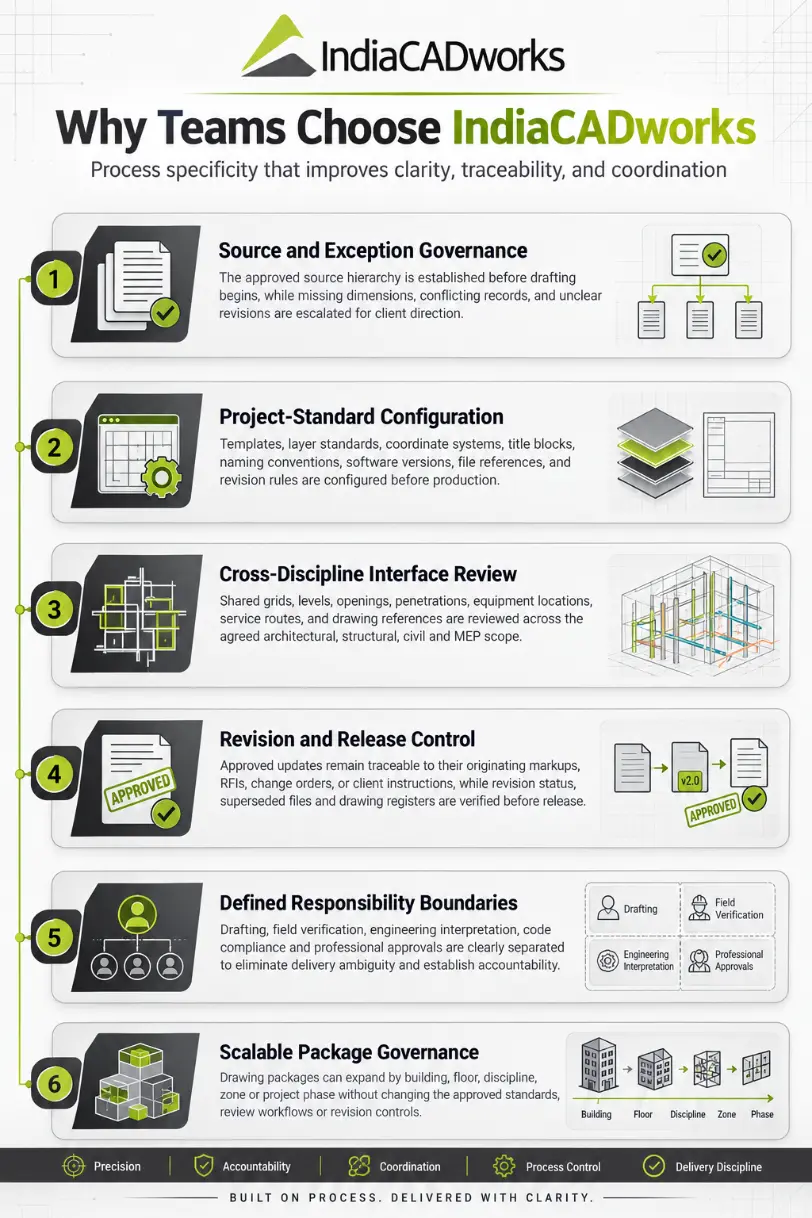
Approved templates, units, coordinate systems, layer standards, sheet numbering, naming conventions, and revision codes are established before drafting begins to maintain consistency across the drawing package.
Source Hierarchy Confirmation
The order of precedence between legacy drawings, verified field records, RFIs, change orders, and client instructions is defined upfront so conflicting information is resolved through approved direction rather than drafting assumptions.
Discrepancy and Exception Control
Missing dimensions, conflicting markups, unclear annotations, and incomplete field records are documented and escalated for clarification before updates are incorporated into the as-built set.
Traceable Drawing Updates
Only approved revisions are incorporated, with each material change linked to its originating markup, RFI, change order, or authorized client instruction to maintain complete revision traceability.
Interface and Drawing Validation
Shared grids, levels, openings, penetrations, equipment locations, service routes, dimensions, and cross-discipline references are reviewed to identify coordination issues before final delivery.
Revision and Release Control
Review comments, superseded files, drawing registers, revision status, naming conventions, and final deliverables are verified before release so the client receives one controlled, audit-ready record package.
-
Need Pricing Details?
- Contact Form
- Live Chat
- Email Us
- 855-259-3709
Hybrid As-Built Update Workflow with Automation Support
CAD specialists incorporate verified field information into existing drawings, while automation supports selected repeatable updates governed by defined geometry and drawing rules. Field-data interpretation, discrepancies, cross-discipline changes, and final record approval stay manually controlled.
- Field Information Review redlines, surveys, VIF dimensions, site notes, photographs, existing drawings, and required record outputs are assessed.
- Selected Update Automation For qualifying drawing conditions, repeatable layouts or detail elements are regenerated after verified dimensional changes are incorporated.
- Drawing Revision and Coordination Dimensions, layouts, openings, annotations, revision clouds, and cross-discipline conditions are updated and reviewed manually.
- Record Package and Quality Control Changes are compared against field inputs, revision records are checked, and final DWG, PDF, or model outputs are reviewed before release.
Get Every As-Built and As-Installed Deliverable From One Provider
Send your redline markups, field notes, or point cloud data for a scope review. We'll walk through discipline coverage, drawing standards, and turnaround before you commit to a project.
-
Start with a Free Trial?
- Contact Form
- Live Chat
- Email Us
- 855-259-3709



Frequently Asked Questions
Automation supports repeatable drawing updates, annotation placement, and schedule extraction under defined rules, while CAD specialists review discrepancies, coordination issues, and final outputs.
We work from .dwg or .pdf markups, laser scans, point measurements, field photos, and handwritten redlines, converting whatever field data you have into CAD drawings.
A short consultation identifies the disciplines and drawing standards you need. We then scope the project, estimate the turnaround time, and confirm pricing before drafting begins.
Drawings are produced primarily in AutoCAD, with output available in Photoshop, MS Word, or MS Publisher formats when your project needs a specific presentation style.
Turnaround depends on project scope, the number of disciplines, and field data quality. We provide a time and cost estimate after the initial consultation, before work starts.
Yes. Coordination between architectural, structural, and MEP as-builts is reviewed manually so cross-discipline conditions, like openings or clearances, are checked before drawings are finalized.
Change Requests are reflected directly in the as-built drawings. Affected areas are marked, and a copy of the CR is attached to the drawing record.
Drawings are produced to match ISO, ANSI, BS 8888, or CSA standards based on your project requirements, with discipline-specific detailing applied during drafting, not after.
Pricing is based on project scope, discipline count, drawing complexity, and field data condition. A detailed quote is provided after reviewing your markups and requirements.
Yes. Drawing volume and discipline coverage can expand within an active project. Scope changes are estimated and confirmed before additional drafting work begins.
You receive full ownership of the delivered drawing files, on CD, DVD, FTP upload, or hard copy, in AutoCAD-compatible formats, at project completion.